
Exporting Published Manuscripts through FTP
This article explains how JAMS sends your published manuscripts to your own server over FTP, and what the publishing process looks like once this is set up.
If you host your journal website outside of JAMS, you can have JAMS deliver each manuscript to your server automatically as soon as it is published. You can then present it on your own website. The transfer uses a secure file transfer protocol (SFTP), so your manuscript data is sent over an encrypted connection.
📝 Note: This feature is for clients who display their published articles on their own or a third-party website. If JAMS hosts your journal website, you do not need it.
Important: Only a Super User can enable and configure this feature, as it lives in the 'Application Features' settings.
Step 1: Enable the feature
In the 'Application Features' section in JAMS, turn on 'Export Published Manuscripts through FTP'.
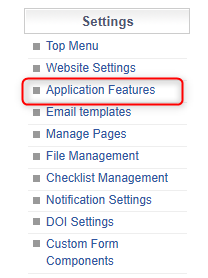

Step 2: Configure your server details
Once the feature is on, click the 'Configure' button and enter the details of the server you want JAMS to send your manuscripts to. This typically includes the host address, port, username, and password or key. Save the details when you are done.
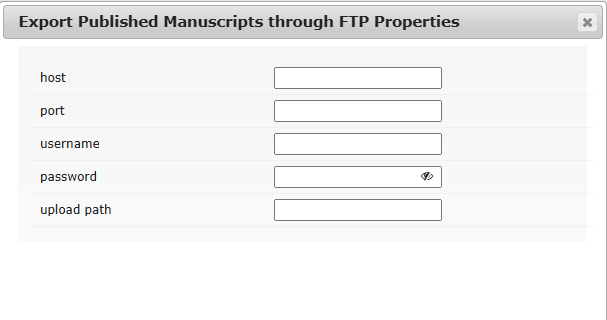
📝 Note: Keep these credentials up to date. If your server details change, JAMS will not be able to deliver manuscripts until you update them here.
What happens when you publish
Once the feature is enabled and your server details are saved, the transfer happens automatically as part of normal publishing. You do not need to send anything by hand.
- An editor publishes a manuscript in the usual way. This works whether the publishing action shows 'Submit' or 'Mark as Published', so you do not need to change how you publish. For more information on this process, see Publish an Article.
- At the point of publication, JAMS sends that manuscript's metadata to the server you configured.
- The manuscript then appears on your server, ready for you to present on your website.
📝 Note: Delivery happens per manuscript, each time one is published. Manuscripts published before the feature was enabled are not sent retroactively.
Presenting the manuscripts on your website
What arrives on your server is the manuscript data from JAMS. How it is displayed is handled on your own website, using whatever system you use to build your journal pages. JAMS delivers the data; your website turns it into published pages for readers.
If a manuscript does not arrive as expected, first check that the feature is still enabled and that your server details are correct, then contact the JAMS support team with the manuscript details so we can investigate.