Reporting Module Overview
This article looks at the Reporting Module, where premium users can view reports on their journal and manuscript processing activity.
The Reporting Module is designed for Super Users to quickly understand the current state of their Production and Peer Review processes. It lets you monitor how manuscripts are moving through workflows, and it gives visibility into the overall activity of your production team, peer reviewers and editors. You can apply filters such as dates, journal, and names, which makes it easier to narrow down the results and focus on the specific subset of activity you need to review.
This means you can access up-to-date visualisations of your journal's manuscript processing statistics, supporting more informed oversight and faster review of changes over time.
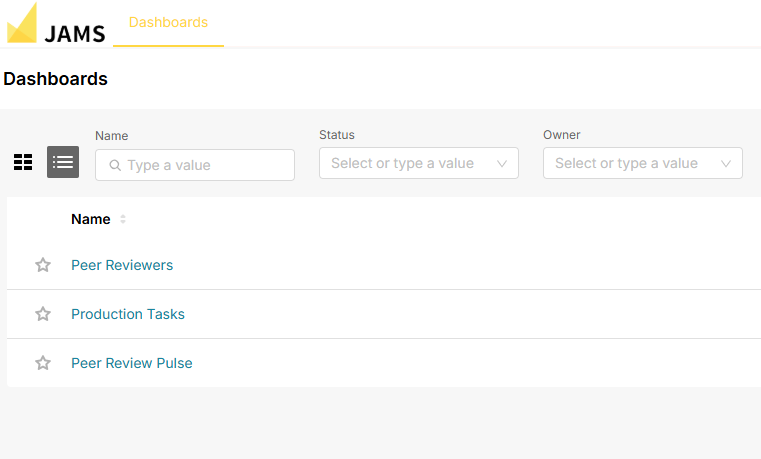
The module brings together dashboards covering your peer reviewers, peer review activity and production tasks. You can explore each one from the reporting menu:
The JAMS team plans to implement more reports in the future.
🗒️Note: This feature is available as a Premium feature for JAMS users. If you'd like to enable it for your journal, please contact our team at customers@jams.pub.
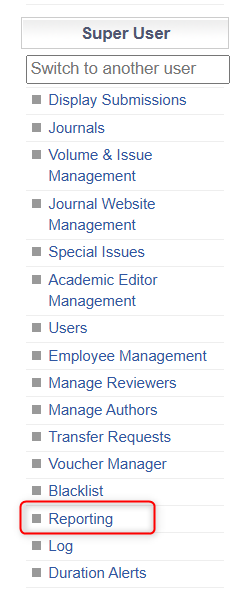
To locate the Reporting Module, head to the Super User Menu and click 'Reporting'.
Users will then be taken to their reporting module and be able to look through the presently available dashboards.